TABLE OF CONTENTS
- Fold Care Demo Video
- Where can a patient download the Fold Care App?
- Apple Store URL for the Fold Care App
- How can I tell if a patient has logged into the Fold Care App or Patient Portal?
- What’s the difference between the Fold Care App and the Patient Web Portal?
- How do I reset a patient's password to the Fold Care App?
- Can patients upload photos and files via the Fold Care App?
- Where do Journeys show up in the Fold Care App?
- Is the Fold Care App available in any other languages?
- How does a patient login to the Fold Care App?
- What if families are sharing the same phone number?
- How does a staff member find a patient’s username?
- Can a username be changed once created?
- Can I manage or view my child’s medical history from my Fold Care App?
- Does Fold Care support facial recognition or touch ID login?
- Can a patient integrate their wearables into the Fold Care App?
- Can a patient login to the Fold Care App outside the USA?
- Troubleshooting
Fold Care Demo Video
Where can a patient download the Fold Care App?
Apple Store URL for the Fold Care App
https://apps.apple.com/us/app/fold-care/id1627017622
Google Play URL for the Fold Care App

Please note that white labelled versions of the Fold Care Apps will have separate links.
How can I tell if a patient has logged into the Fold Care App or Patient Portal?
Individuals who have logged into the Fold Care App will have a green checkbox next to their name on their profile page. See the red circle below.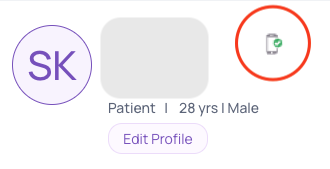
What’s the difference between the Fold Care App and the Patient Web Portal?
If your patient doesn’t have a smartphone they can access all of the features of the Fold Care App via a web portal link. The URL to the Patient Web Portal is typically YOURDOMAIN.patientapp.foldhealth.io. The patient web app and the Fold Care app have identical functionality however individuals using the Patient Web Portal won’t receive App Notifications or real time communication as quickly as if they had the smartphone Fold Care Application.
Individuals who choose to communicate via the Patient Web Portal and no the Fold Care App should be encouraged to login to their App on a recurring basis in order not to miss important communications from their clinic.
How do I reset a patient's password to the Fold Care App?
Resetting a password can be done from the patient’s profile by a staff member, can be done via an automation or can be done by the patient themselves on the login screen.
Below we will review how to reset a patient password by the staff member on the provider portal.
Click on the Patients tab.
- Click on the vertical ellipsis
Select Reset password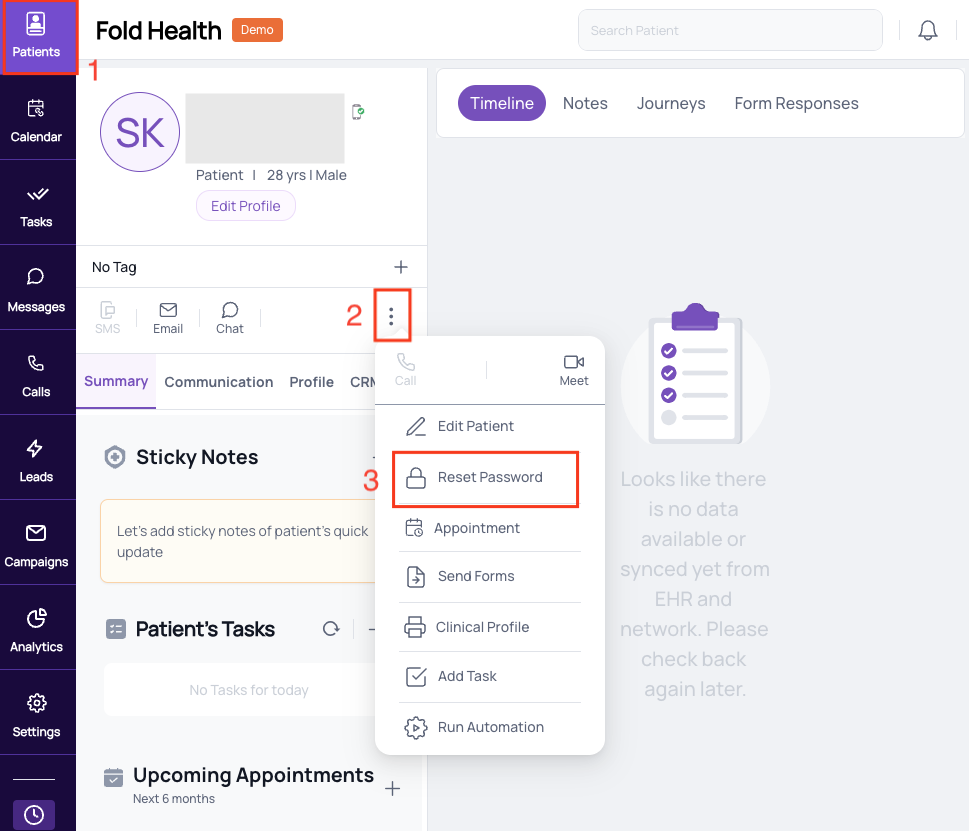
Reset passwords expire after 24 hours. App invites expires after 10 days.
How does a staff member revoke patient access to the Fold Care App?
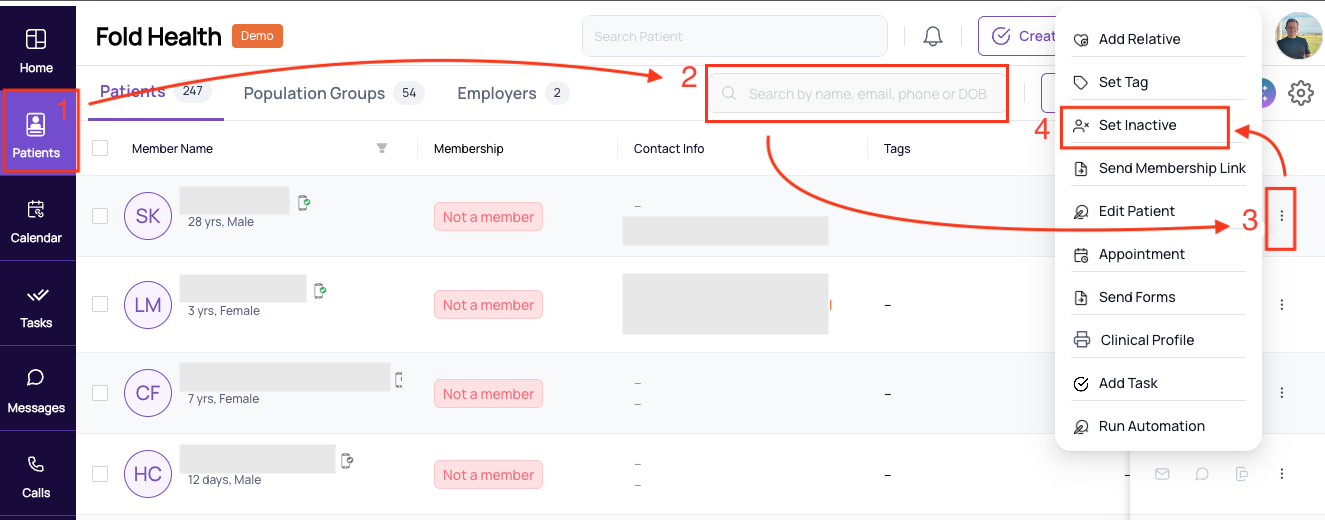
To revoke a patient’s access to the Fold Care App they must be set as Inactive.
To set a patient as Inactive follow the steps below.
Click on the Patients tab on the Left Sidebar.
Search for the patient you would like to make Inactive.
Click on the vertical ellipsis.
Set Inactive.
Can patients upload photos and files via the Fold Care App?
Patients can upload the following file formats Images (.png, .jpg, .jpeg), Videos (.mp4, .mov, mpeg4), Audio (.mp3, .wav) as well as other document formats such as .csv, .doc, .docx, .pdf, .ppt, .pptx, .xls, .xlsx, .zip.
Where do Journeys show up in the Fold Care App?
Journey’s show up in the “Care Journeys” tab on the Fold Care App Homepage.
Is the Fold Care App available in any other languages?
The Fold Care App is available is Spanish. The language of the App is decided by the patient’s native phone settings and can be changed by the patient themselves inside the Fold Care App (Profile → Select Language on the top right hand corner of the screen).
How does a patient login to the Fold Care App?
All patients will need an Invite Link to the Fold Care App by their practice. Only “Fold Active” patients can log into the Fold Care App. At this time Prospects/Leads are not able to be invited to the Fold Care App.
What if families are sharing the same phone number?
- It does not matter if the same phone number is tied to multiple family members as long as the patient is logging in using their email. If only phone number is tied to multiple patient but there email is different, then the patients can login with email rather than phone number and in this case they won’t need to enter DOB.
- If they choose to log in using their phone number, then they will need to enter their DOB. If patient is using either phone number or email and they are linked to multiple patient, then Yes they are required to enter a DOB to find unique patient in both case of email and phone number.
- If multiple patients share both the same phone number and the same DOB (which is very rare), then the app will additionally ask for their first name to confirm identity.
How does a staff member find a patient’s username?
A patient’s username is found on their profile and is typically their firstname.lastname.dateofbirth.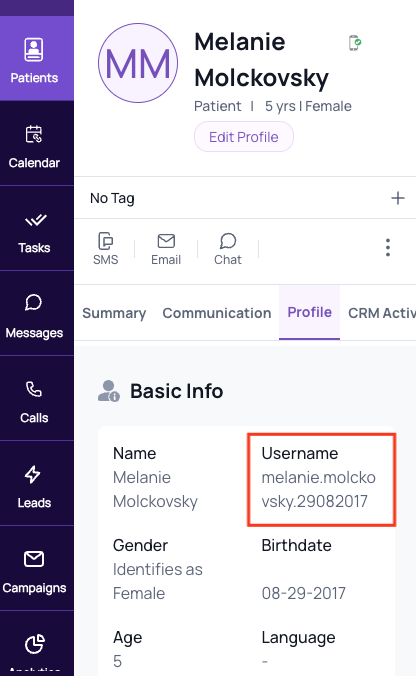
Can a username be changed once created?
A username cannot be changed from the front end once created.
Can I manage or view my child’s medical history from my Fold Care App?
In order to access your child’s health information or communicate on behalf of your child via Fold Care, the child and parent must have either the same email address or phone number on file. To get into your child’s account, follow the steps in the video below.
If the parent has not logged into the child’s profile yet, then you will need to invite them. You can do this by clicking the reset password button from their Fold profile.
A secure login link will be sent to the email and phone number on file.
If the parent is logged into the Fold Care app with their own profile already, then after clicking child’s secure link from the patient invite email, it will logout of the parent’s profile and they can login with child’s profile.
To switch between the child’s and parent’s profiles:
a) User will need to logout from the profile screen.
b) A login screen will show where the user will see email and password.
c) User will need to tap on the email input and, without changing anything, either tap outside of email input box or tap on the ‘Done’ button on the keyboard.
d) After this, because there are multiple contacts associated with same email, a date of birth field will appear. The user can enter either their own or their child’s DOB (for which user they want to access the app).
e) After entering the DOB, the user will see the password field and can enter the password for that particular profile, and can login into the app.
Does Fold Care support facial recognition or touch ID login?
The Fold Care App on iOS supports FaceID, TouchID and plain text login.
The Fold Care App on Android supports fingerprint recognition login and plain text login on Android and does not support facial recognition login.
Can a patient integrate their wearables into the Fold Care App?
Fold Care App Users have the option of integrating with Google Fit or Apple Health from their Fold Care App. To learn more about Wearables integration see our wearables page.
Can a patient login to the Fold Care App outside the USA?
As of right now in an effort to ensure data privacy and security the Fold Care App can only be accessed from within the USA. User may choose to engage with a VPN service to enable access to Fold Health outside of the country.
Troubleshooting
1) A Patient cannot login to the Fold Care App
Make sure that the patient is trying to login to the Fold Care App and not the Fold Grow App.
Ask the patient to try resetting the password on the Fold Care App login screen. A password reset email should be sent as long as there is a default email template under the “Reset Patient Password with Secure Link” template. An SMS should also be sent to the patient as well.
NB: Reset passwords using the Invite Link are good for 30 days.
1. Reset the patient’s password by going to the patient’s profile in Fold. The patient will receive both an SMS and an email with an Invite Link if either is entered in the system.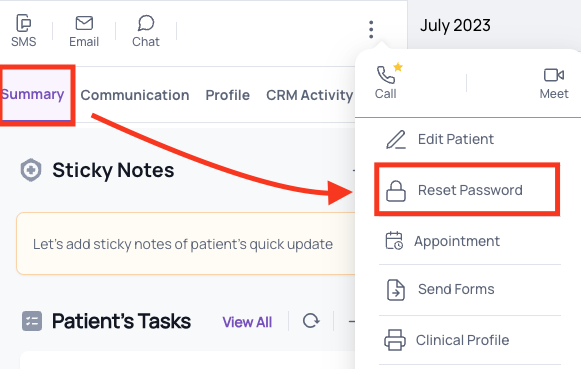
2. Confirm the patient’s username with the patient. The patient’s username can be found on their profile in Fold on the ‘Profile’ tab on their profile.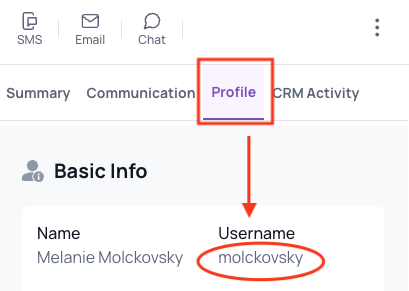
3. Confirm the patient’s email address and phone number in case they are not receiving password resets or App invitations.
4. Ask the patient to update the Fold Care App from their applicable App Store (Apple or Google Play).
5. Ask the patient to uninstall and reinstall the Fold Care app from their applicable App Store (Apple or Google Play).
6. Make sure that the patient is running iOS 12 or above (iOS 12 was released Sept 2018) or Android version 8 or above.
7. Make sure that the patient is logged into the US App Store. (Fold Care is not available for download outside the USA)
Can I download lab results on Fold Care, where did they go?
Any lab results downloaded from Fold Care will go into a Fold Care folder on your phone. Lab results are typically downloaded into pdf format and may take a few minutes to show up on your phone.
Reference : Confluence
Was this article helpful?
That’s Great!
Thank you for your feedback
Sorry! We couldn't be helpful
Thank you for your feedback
Feedback sent
We appreciate your effort and will try to fix the article