A patient cannot login to the Fold Care App
Points to check if a Patient is not able to login to the Fold Care App
Make sure that the patient is trying to login to the Fold Care App and not the Fold Grow App.
Ask the patient to update the Fold Care App from their applicable App Store (Apple or Google Play). Uninstall and reinstall the Fold Care app if needed.
Make sure that the patient is running iOS 12 or above (iOS 12 was released Sept 2018) or Android version 8 or above.
Make sure that the patient is logged into the US App Store. (Fold Care is not available for download outside the USA)
Ask the patient to try resetting the password on the Fold Care App login screen. A password reset email should be sent as long as there is a default email template under the “Reset Patient Password with Secure Link” template. An SMS should also be sent to the patient as well.
NB: Reset passwords using the Invite Link are good for 30 days.
2. How do I reset a patient's password to the Fold Care App?
Resetting a password can be done from the patient’s profile by a staff member, can be done via an automation or can be done by the patient themselves on the login screen.
A. Below we will review how to reset a patient password by the staff member on the provider portal.
1. Search for the Patient.
2. Click on the vertical ellipsis as shown in below screenshot.
3. Select Reset Password option.
4. The patient will receive both an SMS and an email with an Invite Link if either is entered in the system.
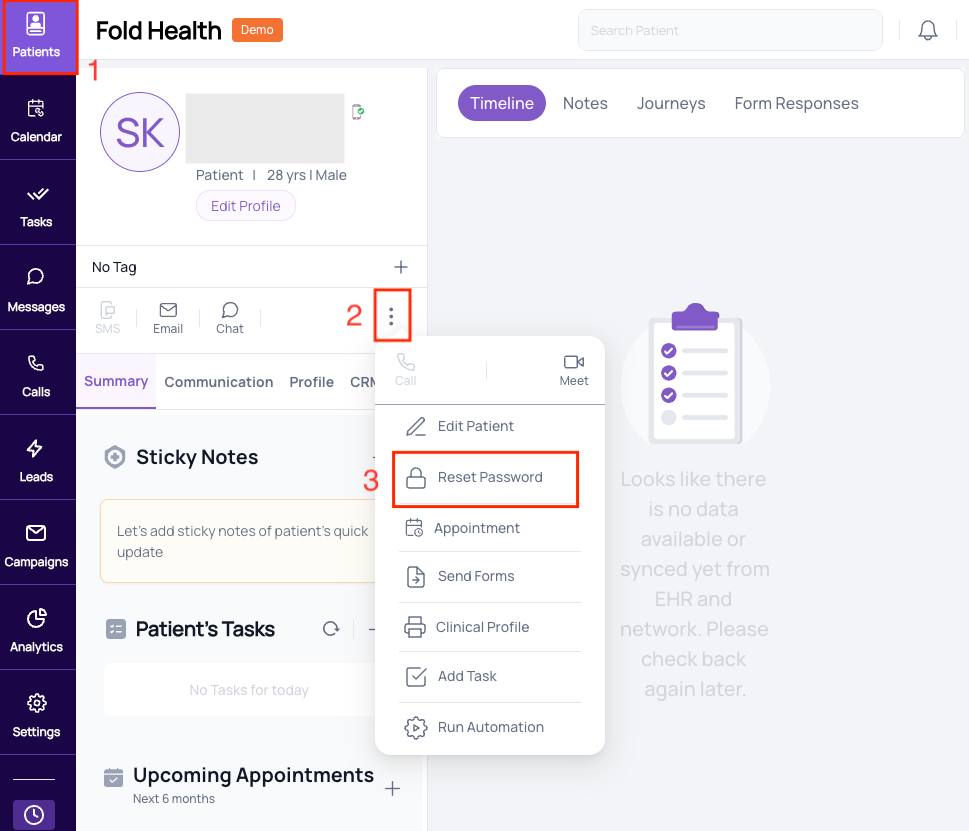 How to reset a password
NOTE: Confirm the patient’s email address and phone number in case they are not receiving password resets or App invitations.
B. Below we will review how a patient can reset a password by himself.
- Patient can reset password on Fold Care application login screen by clicking on Forgot Password.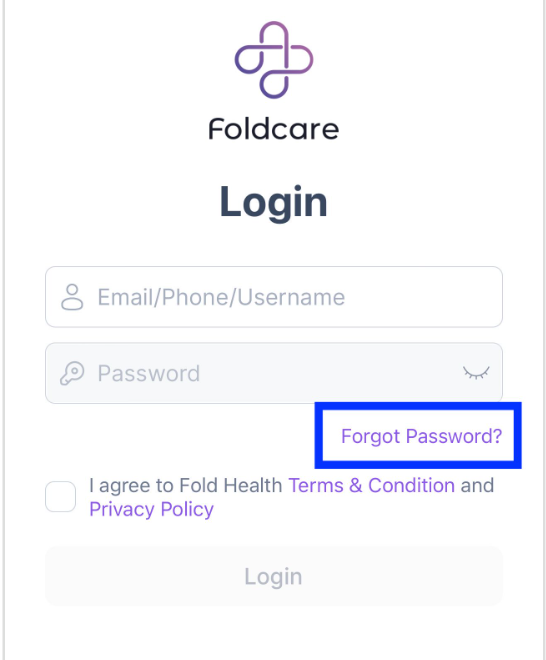
C. How to reset a Staff Member’s Password
A staff member can reset their own password on the Fold Grow App login screen or another user can do it via the profile icon after navigating to Account → Team and finding the staff members name. 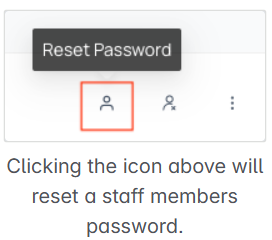
See the relevant article "Troubleshooting: Logging into the Fold Care App"
A provider isn’t showing up in Elation.
Most likely the provider was created in Fold. Due to Elation’s API restrictions, all Providers should be created in Elation and synced with Fold if Elation is your EMR. The same is true for Locations.
An appointment location is showing up in Elation.
Most likely the Location was created in Fold. Due to Elation’s API restrictions, all Locations should be created in Elation and synced with Fold if Elation is your EMR. The same is true for providers.
Reference : Confluence
Was this article helpful?
That’s Great!
Thank you for your feedback
Sorry! We couldn't be helpful
Thank you for your feedback
Feedback sent
We appreciate your effort and will try to fix the article