TABLE OF CONTENTS
- What is the Fold Grow App?
- Where can a staff member download the Fold Grow App?
- What can a staff member do on the Fold Grow App?
- How does a staff member receive incoming phone calls on the Fold Grow App?
- How does a staff member dial an external number from the Fold Grow App?
- How does a staff member send an SMS from the Fold Grow App?
- How does a staff member invite a new staff member to the Fold Grow App?
- How does a staff member login to the Fold Grow App?
- Can a patient login to the Fold Grow App outside the USA?
- Fold Grow App Troubleshooting
What is the Fold Grow App?
The Fold Grow App is the provider facing app that helps providers performs actions on that go that would otherwise require being in the EMR.
Where can a staff member download the Fold Grow App?
The Fold Grow App for iOS can be downloaded here:
https://apps.apple.com/us/app/fold-grow/id1626246460
The Fold Grow App for Android can be downloaded here:
https://play.google.com/store/apps/details?id=com.foldhealth.provider
What can a staff member do on the Fold Grow App?
The Fold Grow App allows staff members to:
view and edit their own schedules and view and edit the schedules of other staff members.
view and respond to all message inboxes and calls.
search for a patient chart and communicate with a patient via chat, SMS, call or video.
search for a lead chart and communicate with the lead via SMS or call.
create new prospects and contacts.
dial an external number.
send an SMS.
How does a staff member receive incoming phone calls on the Fold Grow App?
There are two ways a Fold Grow device can receive incoming phone calls. The first is when a phone number is assigned to a user. This can be done on Settings → Calls → Phone Number. The second is call forwarding via the ‘Dial’ node in a phone tree. The ‘Dial’ Node should be set to a ‘Web Phone’ in order for a call to be forwarded to the user’s Fold Grow App (and Web Browser if they are logged in).
It’s typical for incoming calls on the Web Browser to ring 2-3 seconds ahead of the Fold Grow App will ring.
How does a staff member dial an external number from the Fold Grow App?
Click on the Calls tab, click on the Phone icon in the top right hand corner, and then click on 9 dots in the Search bar. Doing so will open the dial pad. See below for the workflow.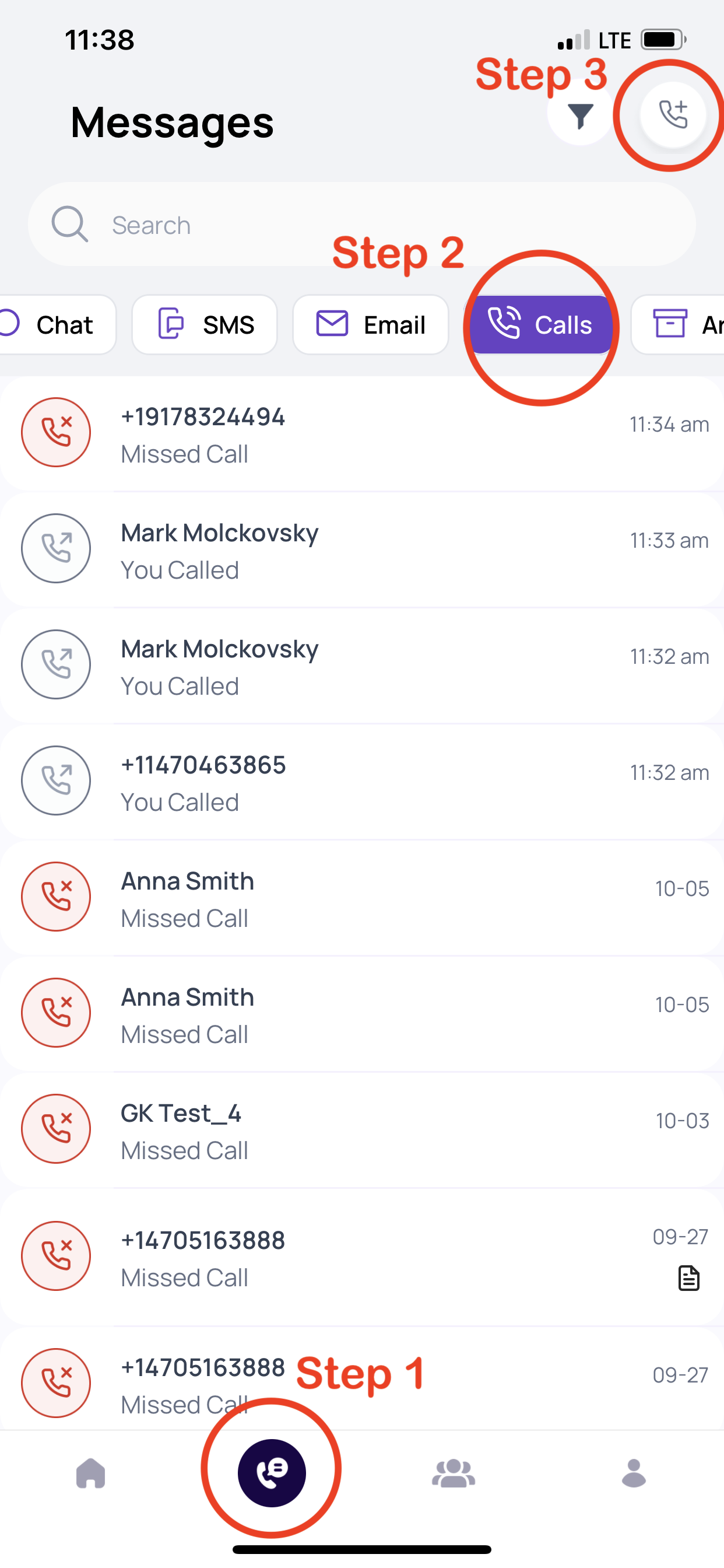
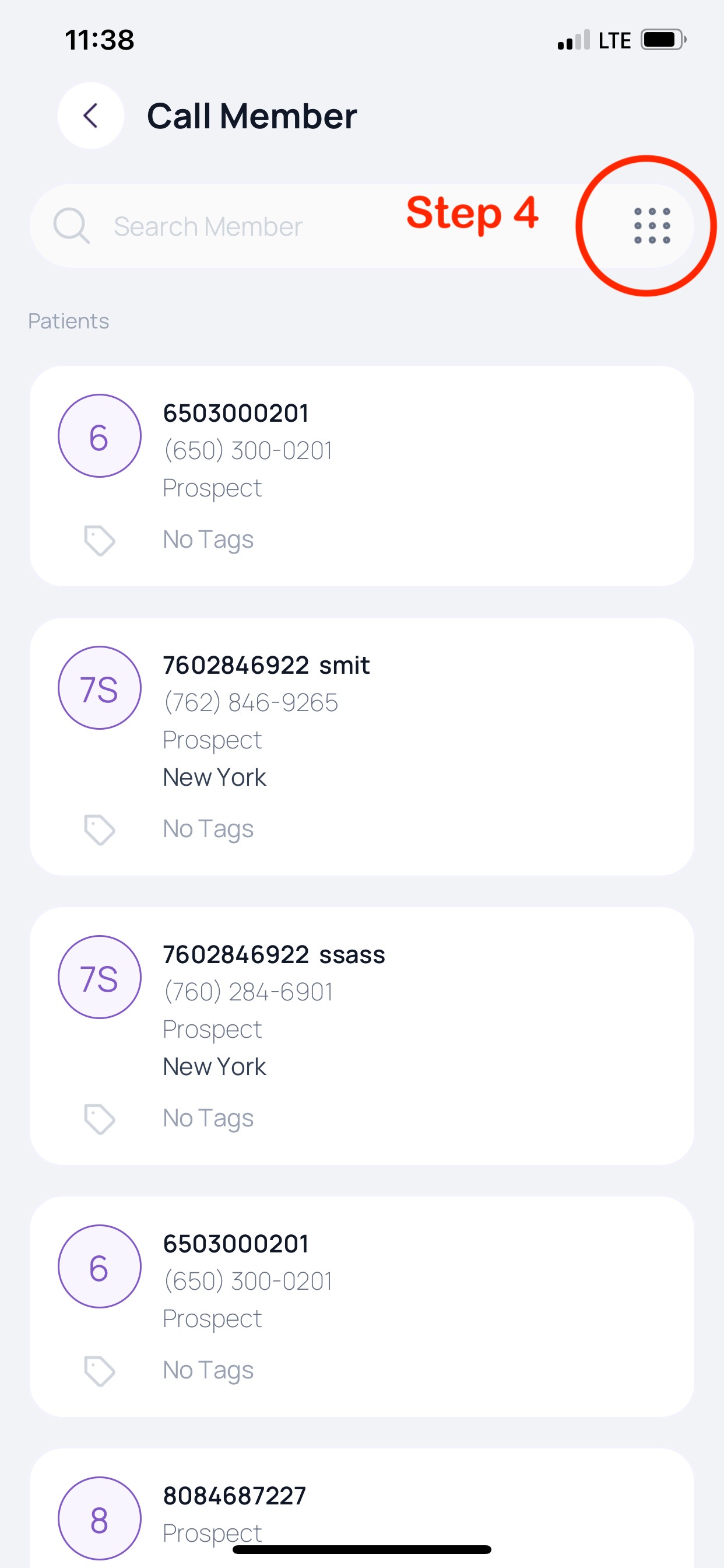
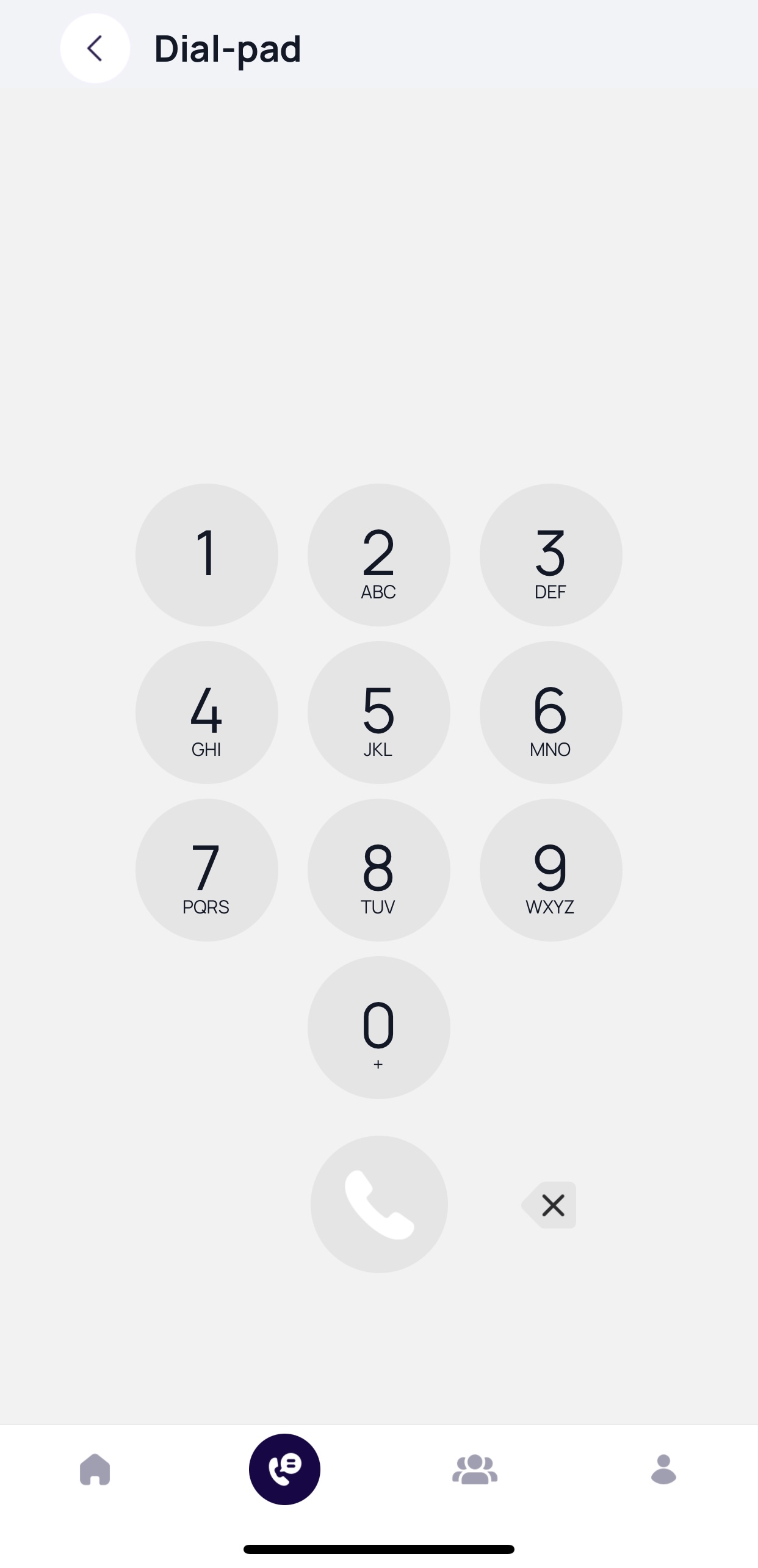
The above workflow will be deprecated for a simpler workflow by Q1 in 2024
How does a staff member send an SMS from the Fold Grow App?
On the SMS tab, enter the phone number you would like to send an SMS to or click on the “ ” icon to open a new message dialogue where an SMS number can be entered. See attached video. The interface will differ slightly between Android and iOS devices.
The above workflow will be deprecated for a simpler workflow by Q1 in 2024
How does a staff member invite a new staff member to the Fold Grow App?
Navigate to Settings → Account → “Invite User”.
NB: Fold Grow App login credentials are the same as the Fold Web App login credentials.
How does a staff member login to the Fold Grow App?
The Fold Grow App on iOS supports FaceID, TouchID and plain text login.
The Fold Grow App on Android supports fingerprint recognition login and plain text login and does not support facial recognition login.
Can a patient login to the Fold Grow App outside the USA?
As of right now in an effort to ensure data privacy and security the Fold Grow App can only be accessed from within the USA. Users may choose to engage with a VPN service to enable access to Fold Health outside of the country.
Fold Grow App Troubleshooting
Cannot login to the Fold Grow App.
Make sure that the staff member is trying to login to the Fold Grow App and not the Fold Care App.
Ask the staff member to reset the password on the Fold Grow App login screen.
Manually reset the password for the staff member in Fold. Navigate to Settings → Accounts → Staff Member and clicking on the icon that says “Reset Password”.
NB: Reset passwords are good for 24 hours while password invites are good for 10 days.

Try quitting the Fold Grow App or if you are using the web app, try quitting/exiting the browser and logging in again.
Try updating the Fold Grow App at your applicable App Store (Apple or Google Play).
Try uninstalling and reinstalling the Fold Grow App at your applicable App Store (Apple or Google Play)
Make sure that the patient is running iOS 12 or above (iOS 12 was released Sept 2018) or Android version 8 or above.
Make sure that the patient is logged into the US App Store. (Fold Grow is not available for download outside the USA)
Calls aren’t coming through to the Fold Grow App
Make sure the user is logged into the Fold Grow App. Intentionally logging out of the Fold Grow App will deregister the user from the phone server database so the device will no longer ring on incoming calls. Logging due to inactivity will NOT register the device from phone services.
Reference : Confluence
Was this article helpful?
That’s Great!
Thank you for your feedback
Sorry! We couldn't be helpful
Thank you for your feedback
Feedback sent
We appreciate your effort and will try to fix the article