This page will review the most common reasons why a patient might be unable to login to the Fold Care or Patient Web app, invalid password issues or invalid username issues.
Before progressing below, ask the patient to reset their password using the password reset feature on the login screen which will usually solve their issue.
1. Are you typing the correct username?
Usernames are generally input as “firstname.lastname.birthday”. Sometimes the birthday is hyperlinked in an SMS or email causing the patient to input only the numeric birthday as their username.
Related Question: How do I find a patient’s username?
Navigate to the Patient’s Profile. Look for a “Profile” tab (left sidebar under the profile photo) and the username should be underneath.
2. Are you using the correct application?
Please make sure that the patient downloaded the Fold Care App from the App Store or Google Play store and not the Fold Grow App. As a reminder, the Fold Care App is the patient experience that allows patients communicate with medical staff, view lab work, documentation, imaging and schedule appointments (if you have enabled self-scheduling). Fold Grow is the App that medical staff and providers use to communicate with patients.
3. What if two invites were sent within a short time frame ?
Every time an email or SMS invite is sent in an automation the password generated is unique and each new invite invalidates the password sent prior. So for example, if an email and an SMS invite are sent in the same automation, only the 2nd password that is sent will be the correct password. Because the email and SMS are sent almost simultaneously it will be impossible to tell which password is the valid one. The best practice in sending a password via an automation is to give a patient enough time to find their password and to avoid sending a password via email and SMS (pick one medium).
When an app invite is sent, a secure link is generated and can be sent via SMS, email, or both. Sending the secure link multiple times does not invalidate any previously sent links. The links are only invalidated when the patient successfully logs into the Fold Care app using a valid secure link. This same behavior applies when a provider resets the patient's password from their profile.
4. Password doesn’t work on the Patient Web Portal?
- Sometimes hidden or invisible characters can show up in login fields (this isn’t an issue specific to Fold). Try closing the browser and reopening it.
- Instead of turning off your computer completely, try restarting it. When you restart your computer, it shuts down all processes and reinitialise the entire system, which can resolve many common issues.
- Make sure that the username and password do not fill in automatically in the login area. Try entering the username and password yourself.
5. How to subscribe to Email/SMS notifications?
- If the patient uses the Fold Care App, they can subscribe to the email/SMS categories in the Profile>> Communication Pref, as in below screenshot
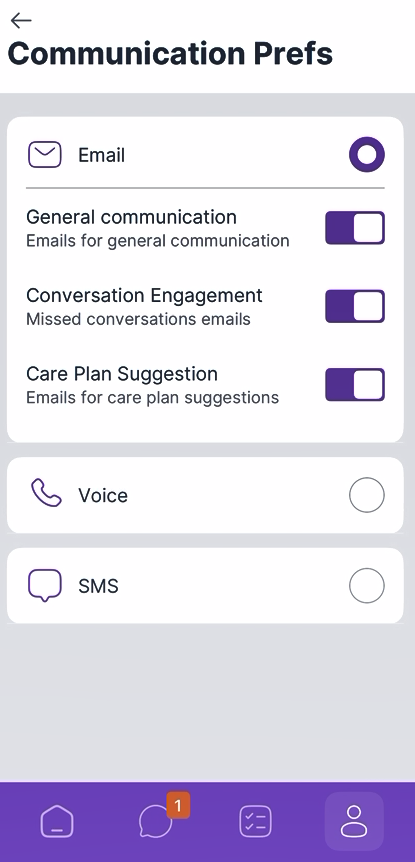
Reference: Confluence
Was this article helpful?
That’s Great!
Thank you for your feedback
Sorry! We couldn't be helpful
Thank you for your feedback
Feedback sent
We appreciate your effort and will try to fix the article