Setting up a Clinic & User Schedule
How do I set office hours or create a clinic schedule?
Navigate to Settings → Calendar → Practice Availability.
For each practice location, you need to specify office hours. These hours should represent the full time that your office is open. If you are using Fold phones, when Fold phone numbers are assigned to a location rather than a user, the office hours you set here will dictate if an office hours or out-of-office phone tree is played for the caller.
How do I create a provider or user schedule?
Navigate to the Settings → Calendar → User Availability → Search for user → Click the ellipsis next to the user's name → Edit.
Fold user availability affects staff appointment scheduling and patient self-scheduling. For this reason, Fold recommends configuring user availability for each individual user. If you do not configure calendars at the individual user level, the Fold system will default them to the practice availability you have set; this affects when in-office vs. out of office phone trees and away messages are active.
All providers can be associated with multiple physical locations and are also given a virtual location that can be set separately for virtual appointments. If your organization offers both in-clinic and virtual appointments, add User Availability for both virtual and onsite locations: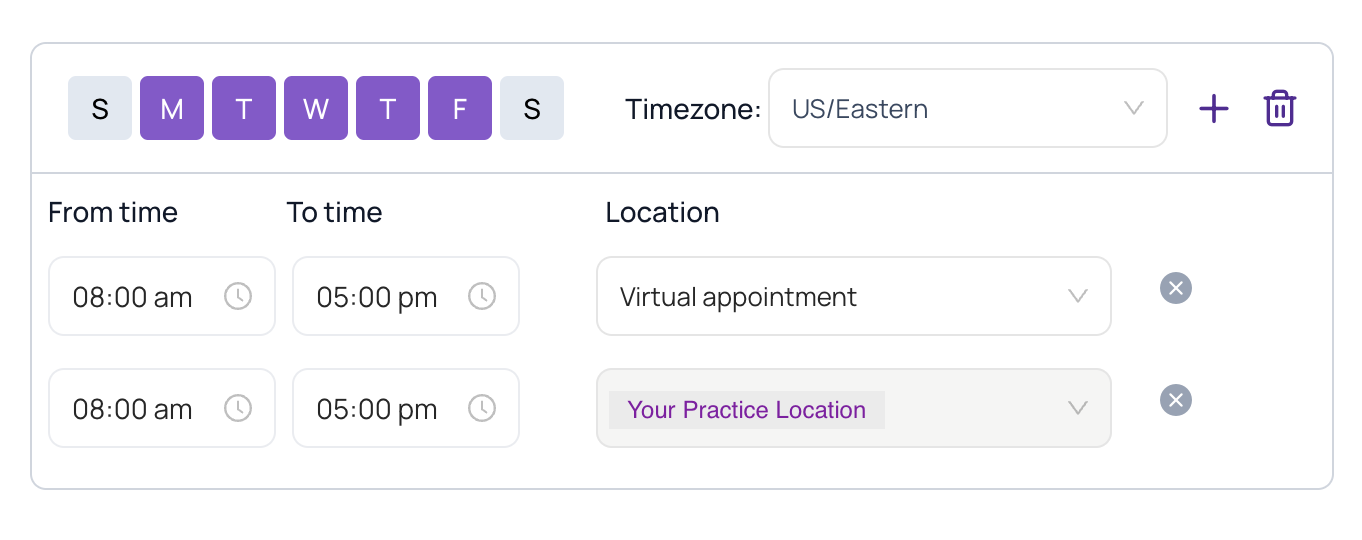
Was this article helpful?
That’s Great!
Thank you for your feedback
Sorry! We couldn't be helpful
Thank you for your feedback
Feedback sent
We appreciate your effort and will try to fix the article