What are template responses?
Template responses (sometimes referred to as quick text, dot phrases or auto text in EHRs) are snippets of text that can be invoked via short code text. Template responses are designed to save you time and can be invoked using typing ‘/' (backslash). Once typing '/’ a list of template responses will appear.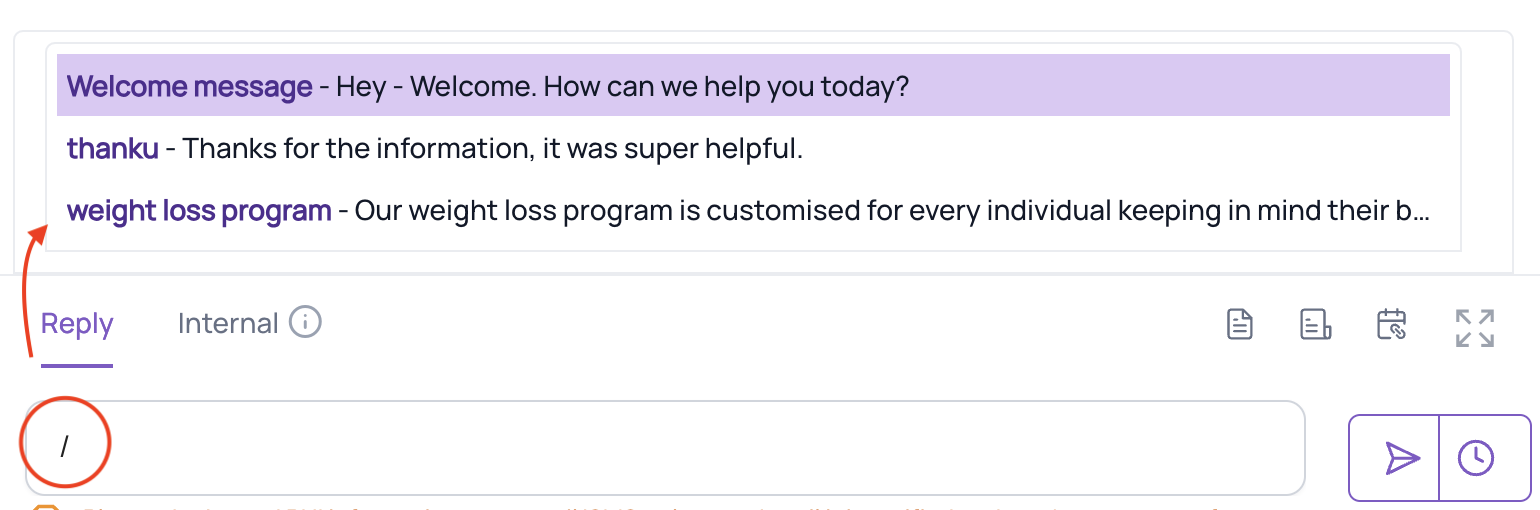
Best Practice: Create a template response with your location address. When sent to a patient, the patient can easily click for GPS.
Where can I use template responses?
Template responses can be used when composing chat messages, emails, SMS messages or notes. Template responses can only be used at the beginning of the message/email/SMS/note. Template responses must be “turned on” for the specific type of medium or for all the mediums (chat, email, SMS).
How do I set up template responses?
Please note: Template responses are created in two different locations within the settings in Fold. They have different functions, depending on which sections you use to create Template Responses:
- To create template responses that are used in your Communications (SMS, email), navigate to Settings > Messages > Template Responses > + New.
- To create template responses that are used in your Notes, navigate to Settings > Content > Template Responses > + New.
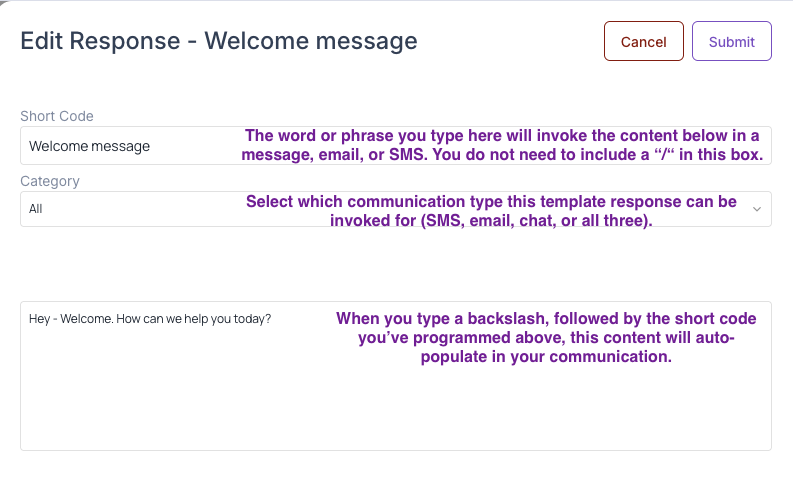
Fill in the template response fields, as indicted below:
Was this article helpful?
That’s Great!
Thank you for your feedback
Sorry! We couldn't be helpful
Thank you for your feedback
Feedback sent
We appreciate your effort and will try to fix the article